Monadic JavaFX
This is a bit technical but the short version is: I liked Apache Flex for creating desktop UIs, I sort-of like JavaFX because it’s like Adobe Flex, I do a lot of my development in Scala, and I recently learned a UI system called Gradio (https://gradio.app), so I thought I’d try to create a wrapper around ScalaFX/JavaFX that works like Gradio does, which is to say it treats controls like monads. That’s this project here.
A monad is difficult to explain, but the idea is that, if a value is … let’s call it “integer-ish”, then any algorithm that starts with an integer should be able to use it. If I have a function that maps an Integer to a String and I have something that’s “integer-ish”, then the computer should be able to figure out how to use the function to generate something that’s “string-ish” for the same meaning of “-ish”. Monads are a technique for standardizing the different kinds of “-ish” so that you can get to the important value.
Some examples of “integer-ish” are “it may not exist, but if it does it’s an integer” (Option[Int]), or “I don’t know what it is yet, but when I do it will be an integer” (Future[Int]), or "it’s not one integer; it’s actually a whole list of integers” (List[Int]). Option, Future, and List are monad types, and by standardizing the way we access them, we can apply functions that use integers.
UI controls are usually categorized by the type of value they naively provide. For instance, a text field naively provides a string, because it’s text. But, if you want to give users a way to input their age and you give them a text field, you really want the control to provide an integer. This requires you to implement a way to validate that the content is an integer, convert the string to an integer, report the error to the user, etc. And this often gets in the way of the application you actually want to provide. A text field that is meant to provide an integer is “integer-ish”, so it can be represented as a monad Control[Int] (it ended up being Control[Int, ?], which means “it’s basically a monad on integer except for something you don’t need to care about”).
I started this project with the following use cases in view:
I want to be able to connect the wearable in this project so I can configure a gesture like “hold” or “tap and hold” to increment or decrement an integer at a configured rate (“decrease by 1 for every 0.1 seconds to a minimum of 0” or “increase by 1 for every second to a maximum of 10”, etc.) and I want that control to be indistinguishable to my application from a slider control on the UI.
I want to hide from the main application the validation logic like a text field validating that the value is in the format of an integer.
I wanted to provide the ability, like Gradio has, of changing the entire type of control if I want to. Like, it can replace a text field that says, “you haven’t provided me enough information” with an embedded YouTube player as long as both are “string-ish”, in that the text field displays a string it’s given and a YouTube player references a string for the URL of the video to play.
I wanted it to play nicely with FXML. Gradio is great because it’s fast to prototype and, if you don’t care about how it looks in detail, it’s easy to get a simple application up quickly. I was less concerned about getting a bare-minimum application up quickly and more concerned about making sure it was possible to integrate with FXML, because I like the usage model of laying out the UI in a markup language, handling most of the visible components in markup, and not having to mix visualizing the controls with a procedural language, where every single value is set at the same level of attention (in a markup language like FXML, I can view the hierarchy of components without having to actively ignore every property like CSS class, text color setting, alignment setting, etc. I wish FXML was less rigidly tied to the object model and more intuitively XML, but it is better than doing everything in Java). If I can go back and make it work as simply as Gradio, I may do that, but my priority was to be able to tie it an FXML document.
I wanted to play around with Scala 3 macros because ScalaFXML never made the transition to Scala 3 macros and I wanted to see if I could do something good. JavaFX is tricky to get running because so much of its setup relies on strings rather than types that can be checked at compile-time and it’s even worse if you’re trying to get it to work in Scala.
I only hacked on it one weekend, and it’s a pretty good start. It has the simplest use cases (a text field that can be exposed as Control[Int, ?] and Control[String, ?], and a CheckBox that can be exposed as Control[Boolean, ?], Control[Int, ?], and Control[String, ?]), and the logic can change style classes as well as work with the control platform-neutrally (not having to know it’s a JavaFX control if you don’t want to care). There are a number of improvements I’d like to make, but we’ll see how fast I get to it. If there’s no outside interest, maybe I won’t.
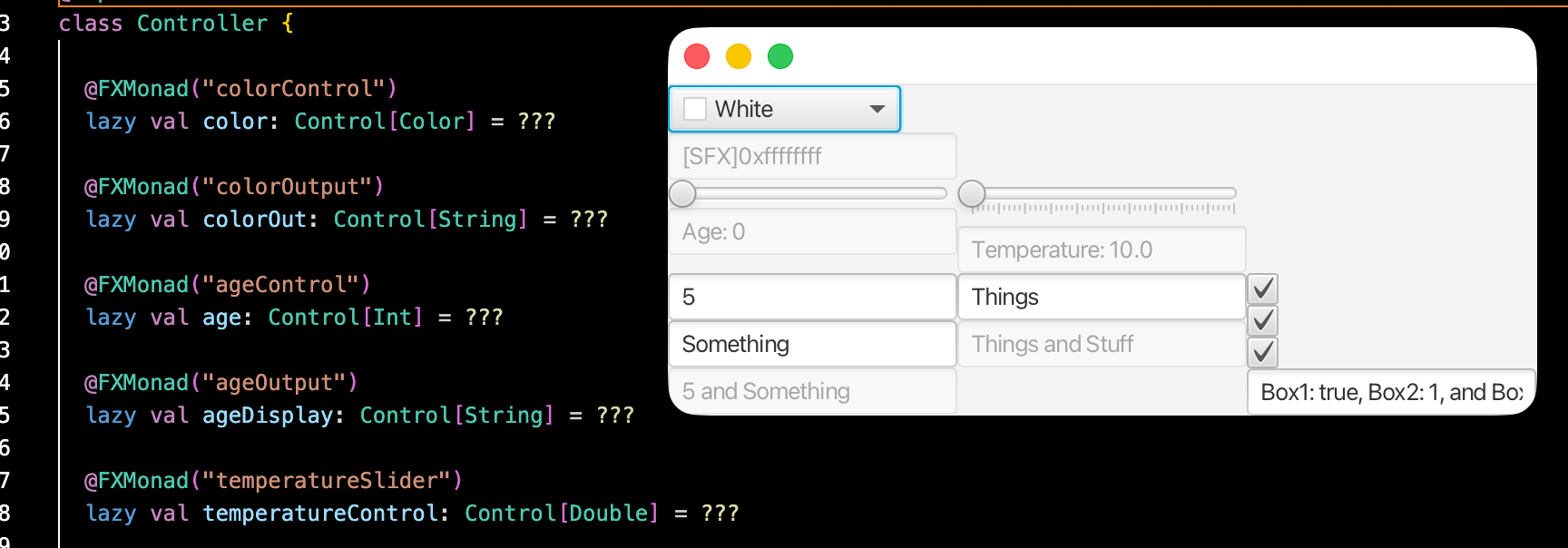
The code looks like:
class Controller {
    @FXMonad("textbox1")
    lazy val ageControl: Control[Int] = ???

    @FXMonad("textbox2")
    lazy val nameControl: Control[String] = ???

    @FXMonad("textbox3")
    lazy val displayControl: Control[String] = ???
    ....
}
This code would use a macro to create a Control[Int, ?] named ageControl based on a JavaFX TextField control name “textbox1” in the FXML. JavaFX would be able to initialize the controller in such a way that the application could later provide the following code (inside Controller#initialize, for instance):
displayControl(ageControl, nameControl) = (age: Int, name: String) => {
TextFieldControlString(s”${name} will be 100 in ${100 - age} years.”)
}
The system will re-run the function every time textbox1 or textbox2 changes (and, in textbox1’s case, passes format validation imposed by ageControl). It is able to enforce the type of the function to be (Int, String) => Control[String] based on the types of ageControl and nameControl, and is able to provide the input values to the function in a strongly-typed way.
If the type of the return value is not “TextFieldControlString” but “ComboBoxControlString”, the goal is for the system to replace textbox3 with a checkbox, and it would still be reference-able as “displayControl” as they would both be type Control[String, ?]. This doesn’t work yet, but I think it could.
Improvements;
Error reporting. Right now, the only kind of error reporting for things like a TextField that should have an integer in it gets its style changed to “error” (the user has to define the style for error) and the title gets changed to the error message. There should be an argument to @FXMonad to provide alternative error reporting means, like an alert box or a TextArea for displaying all the fields’ errors.
Creating the control in the application logic should have a platform neutral option. Instead of “TextFieldControlString” like above, maybe there should be a “StringControl” class that is of type “Control[String, ?]”. displayControl would be capable of identifying it and only transferring the value of defaultProperty.
Possibly pass in the existing control, or a constructor for the current control type. But I don’t like that. Maybe something like "displayControl.getNew()” which would create whatever displayControl currently is, but it’s still a clone and not applied until the value is returned from the function.
Right now, Control uses ScalaFX property beans, which wrap JavaFX property beans. This provides reactive (or at least reactive-like) behavior for the data, and it’s good enough that it could be used for the wearable controls I want to use, but I can imagine it out-growing that. It seems like a lot of work right now to replace it with something else.